max_msp
Vidgets: The Development and Use of Interactive, Network Based Video Works by David Wolf (dpwolf)
dpwolf has finished his thesis - you can download it from his site - it's called Vidgets: The Development and Use of Interactive, Network Based Video Works by David Wolf (dpwolf)
I've downloaded it but haven't finished reading it yet. he makes cool live video performances using isadora and quartz composer and the music is made with controllers and max / msp. I'd been to a workshop of his the previous year and that's how I started trying out isadora. (obviously he's more advanced than me ;)
I noticed page 138 has a photo which looks like a capture from a video I took of his & Somaya's performance at electrofringe 2006. I thought I had a photo but can't find it but I have a video. and the other photographer in the room was on the other side of the room as I recall. small world.
- AliaK's blog
- Login or register to post comments
electrofringe 2006 - max msp workshop - video patch
one of the workshops we did at electrofringe 2006 was on max / msp with Bruce Mowson
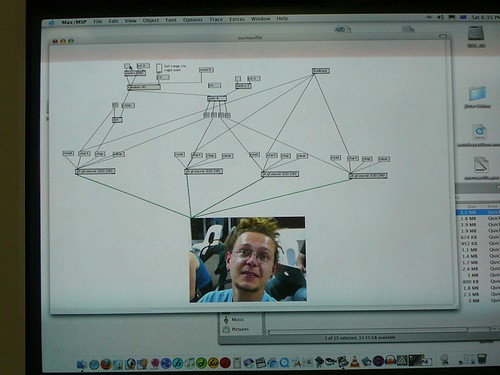
our group made a simple max patch which rotated through a few video clips we recorded of people who were in the workshop. we'd asked them to say something about the electrofringe / this is not art festival. the patch was basically a random video player. we only had an hour to make it so we chose something simple. we had to show Bruce the following day. our patch worked and we were one of two groups (well our group + 1 person from another group) who turned up the next day to demonstrate the finished patch
here's a photo of the attached patch - version 2

Mark's patch worked too - his is much more advanced! it's an identity bank ATM machine
Mark is from Chailight Productions - he lives in Melbourne now, but used to live in Brisbane and run the Spin'n'Jam nights, amongst other things such as some of the outdoor parties

one of the slides in Bruce's talk. I tried the url in the photo but it's a dead link now - granted it is 2 years later ;) no luck finding it on the wayback machine either :(

This is Not Art festival, Newcastle, Australia.
Electrofringe workshops.
Saturday 30/09/2006
- kathy's blog
- Login or register to post comments
tina 2006 - David Wolf and Somaya Langley - TBA
part of the video, audio performance by Somaya Langley who uses gestural movements combined with accelerometer sensors attached to her outfit, and David Wolf who provided the visual feast to accompany the soundscapes. part of Electrofringe 2006 festival in Newcastle, Australia, on sunday 01/10/2006.
http://www.thisisnotart.org/Members/ben/david-wolf-and-somaya-langley-tba/
TBA explores sonic city spaces through a gestural interface. In the current sociological climate, the city can be an alienating yet sonically rich space. Individuals potentially relate more closely to the city, the buildings and architecture than they do to the other inhabitants. However, the city is an ever-changing environment demolishing buildings, resurrecting monuments simultaneous moments of destruction and resurrection. Using footage of Newcastle as well as abstract and generative 3D systems, elements are combined and manipulated in real time using custom built applications developed with Quartz Composer and Max/MSP.
- kathy's blog
- Login or register to post comments
Real World Max/MSP/Jitter & Glitch for VJs via Vade's blog
Vade's blog has max patches and tutorials for creating glitch videos and other cool stuff.
- kathy's blog
- Login or register to post comments
the software I'm using most often these days
This is a reply to a post on Stealth board listing the software I'm using most often these days.
http://www.stealthmag.com/board/viewthread.php?tid=6461
yeah gimp is good. the interface isn't as nice as photoshop but it's free / open source and has many of the same features for image editing & conversion. if u were a graphic designer u'd probably go with photoshop cs or similar but for simple resizing/cropping and converting gimp does the same job.
http://www.gimp.org
here's a list of my fav s/w atm (at least what I'm using most these days). I've been playing with a bit of videoblogging so a lot of this is video related. (not in any order)
isadora : http://www.troikatronix.com/isadora.html
it's really cool for realtime video processing. so u could spend hours using it. even if u don't have a camera yourself, just download some quicktime movies from one of the videoblogging sites and do a cutup remix or something. the demo version (which I'm still using) only lets u save 5sec, so to make anything longer, u can just save 5sec at a time then past e them altogether in quicktime or another editing tool. some of the effects are similar to jitter (the video add on to max/msp) but they're all prebuilt so u don't have to write the code. just connect the patch cords.
http://www.troikatronix.com/isadora.html
max/msp http://www.cycling74.com
- it's great for writing realtime music. generally used in art / sound art installations or universities and experimental performances. jitter is the video processing as mentioned above. easy to spend hours using it. though the learning curve is a bit steep until u get the hang of it. I did a course which was helpful. has a 30 day demo. I bought the student price which is $59 for 9months licence so handy if you're doing a project.
http://www.cycling74.com
quicktime pro - www.apple.com/quicktime
if u pay the $30 to upgrade to quicktime pro u can then do video editing in quicktime. it does interactive video as well. and you can add text tracks, html links, link the whole video movie.
www.apple.com/quicktime
freemind mind mapping software
http://freemind.sourceforge.net/wiki/index.php/Main_Page
- this is great for writing all those ideas down and collecting your thoughts & brainstorming
http://freemind.sourceforge.net/wiki/index.php/Main_Page
drupal - www.drupal.org
- I use this every day. it's a CMS (content management system) and has features such as blog, rss, chat, forums, user access, stories, project management, images, videoblogging & podcasting support, + a heap more. basically it creates your website then you can start posting information up and sorting/catergorising it
www.drupal.org
if u don't have a website, setup a blogger.com account (free) and start posting info and your creations and let us know the links.
avid free DV - http://www.avid.com/freedv/index.asp
- it's a cutdown version of avid's non-linear editing software. perfect for home use. has the same interface as the versions used in professional video editing houses so good to learn if u hope to work in that field one day.
http://www.avid.com/freedv/index.asp
skype - www.skype.com
- for chatting to your friends for free. good for collaborative projects also.
www.skype.com
eZediaQTI - http://www.ezedia.com/products/eZediaQTI/
- for creating quicktime videos / videoblog movies. easy to do text and tracks and interactivity if you don't want to do it manually in quicktime. demo version limited to 5 objects but that's usually ok for small projects
http://www.ezedia.com/products/eZediaQTI/
itunes - www.apple.com/itunes
- for listening to music and podcasts. ipodder/lemon also good
www.apple.com/itunes
audacity - http://audacity.sourceforge.net/
- for audio recording and basic processing. u could do a track for the stealth remix thread in this!
http://audacity.sourceforge.net/
hiphopstarz - www.hiphopstarz.com
- free, basic sequencer for creating beats. it's a very simple interface. looks a bit dodgy but works ok for beginner level stuff. doesn't have all the features of cuebase etc, but it's free. if anyone has another good free /opensource replacement, let us know!
www.hiphopstarz.com
fireant - http://fireant.tv/download
- great videoblog aggregator / viewer. you can also use itunes or just view in the web pages, but this is a separate app which does it also. they usually recommend some good videos to watch / subscribe to.
http://fireant.tv/download
if I had a mac I'd be using quartz composer for video also. but I don't so I can't :(
ourmedia - ourmedia.org + Internet Archive - www.archive.org
- I use this to upload video and audio to IA. it's also a blogging site similar to blogger but looks different. if u need hosting space, this could be an option for original works ie don't upload your mp3 collection or u'll be banned. but if u make a track or a video they'd love u to upload it (free)
www.ourmedia.org
some of the producers here could possibly recommend better audio software. but have a play with video - it's fun. combines everything!
microsoft visual c# - www.microsoft.com
- if you want to try programming, c# is probably good to start with. it's a bit like c and java, but you can use the IDE and create windows/web apps pretty easily.
www.microsoft.com
flickr - www.flickr.com
- upload all your photos. it's social software, so you can add friends and tags, and see when your friends upload new pics, and they see when u do. also good for hosting your images. u can get a free account or upgrade to a paid account if u have lots of pics
www.flickr.com
- kathy's blog
- Login or register to post comments
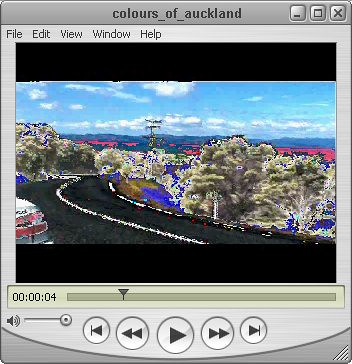
colours of Auckland countryside

click on the image to goto the video player page
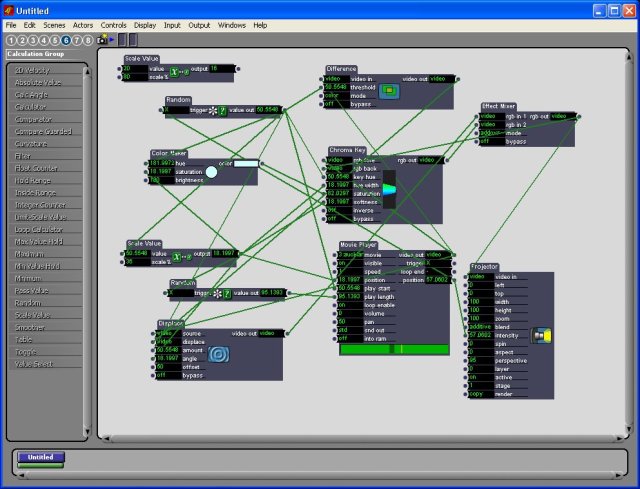
I've been spending the Christmas break learning more about interactive quicktime, max/msp and isadora for creating music and video and publishing them on the net. Below is the first piece I've created. I went a bit overboard on the effects in Isadora but it's an original piece and I learnt from it so I'm happy with it overall from a learning experience point of view.
How I created it:
- first I took videos with my dvd camera
- then I used DVDx to convert the .vob files to mpeg2 files which quicktime could open. when I installed winamp a couple of weeks ago, I noticed it can display video now also, though strangely, sometimes the winamp videos were upside down whilst they played correctly orientated in quicktime. (perhaps I used strange setting whilst encoding?)
- then I imported the video into isadora, and patched up a storm whilst trying out some of the effects
- I can only save 5sec clips from isadora as I'm using the trial version whilst I work out if I'll use it regularly in future. I'm hoping to learn how to do similar tasks in jitter (max component) as I'll have more control of what I'm doing, even though it's very quick and easy to get things done in isadora without having to know the code. still yet to decide on this.
- once I had the processed video clips, I opened them in quicktime again and joined them together - hence the rough edits
- then I made a couple of text tracks in quicktime and added these in. I tried out the eZediaQTI app whilst learning about the text tracks but decided on doing them manually in quicktime and editing the controls with notepad.
- next, I opened the gps data music patch I made in max/msp and ran it with the soundwalk recordings I made the other week whilst at Mission Beach in Auckland. unfortunately, the mic was picking up a lot of noise from the wind blowing past the mic pickup so there's a lot of distortion. I filtered some of this out in audacity and flattened the audio into one track.
- then I added the audio track to the video with text quicktime movie
- then uploaded the finished piece to archive.org using ourmedia and viewed source on the movie's ourmedia page & copied the quicktime player code here
well, I'm sure there's a quicker way of doing it! which requires less processing and time, but this was an exercise in creating an original piece from start to finish. as you can tell, I'm not a designer or very good programmer either, but I'm happy to finish number one. here's hoping the subsequent efforts will improve and be done more efficiently. I could have used the original unprocessed videos but they seemed a little plain. need to find the right balance I guess..
here's a screen shot of the isadora patch:

- kathy's blog
- Login or register to post comments
- Read more
max/msp course @ Goldsmiths college, London - gps data music patch project
earlier this year I did a max/msp course at goldsmiths college. the class was taken by the very clever and talented sebastian lexer who puts on the interlace events in london and performs at various events and festivals. if you're looking for a max/msp course, I highly recommend this one - whether you've used max/msp before or not. the projects by the other class members were really cool also!
apart from the class notes I took we had to do a little project for the last day (4th day). I'd recently gone on the gps for artists workshop on Isle of Wight and bought myself a handheld gps device to record data on the driving trips I was doing. so, for my project, I made, with a lot of help from Sebastian! a patch which read gps data from a file, then parsed it into smaller sections to break it down into the different fields such as longitude & latitude, speed, direction, time, altitude etc. then I connected these values to the inputs of a vst filter/plugin called ambience, and played an audio recording and had the gps data adjust the filter parameters by stepping through the gps co-ordinates. also, the longitude & latitude are mapped to an x & y co-ordinate of a graph, so when the gps points are moved, you can see the x/y co-ords move too. for this version of the patch, I selected co-ords which would move around the screen according to the scale I chose. obviously if the area travelled is quite close, then the scale needs to be adjusted or you won't see much movement.
one day I'd like to expand the project so the gps data generates a music soundscape using samples I've recorded along the way. also it'll display geotagged photos taken on the journey as the gps points are processed.
attached is a screen shot of the patch and the actual patch, and some sample gps data. if you want to try it then you'd need your own audio file to open (any will do) and have the ambience vst plugin.

- kathy's blog
- Login or register to post comments
- Read more
dpwolf, quartz composer and electrofringe workshops
I went to 2005 electrofringe a few weeks ago in Newcastle, Australia. I haven't finished going over my notes or posting some of the links to the artist's projects, but one of the workshops I went to was on Quartz Composer hosted by dpwolf. The software runs on a MAC, which unfortunately I don't have. :( perhaps if we get a project bonus this year I might be able to save up for one so I can try the software (and also max / msp }. anyway, I also came across the name dpwolf on the videoblogging mail list and low and behold it's the same person. he seems to do some work with Adrian Miles, who does some great projects with video and interactive quicktime and media in general. small world. I'd love to do the course Adrian teaches but can't afford to give up work to do it fulltime. due to excessive work commitments, I had to drop the Internet Communication course I was doing at CQU. now that I've finally upgraded my (this) site and moving most of my projects online (so as not to be so dependant on my laptop in case of travelling without it), I'd like to experiment more with blogging, videoblogging, podcasting and digital art and music projects (in addition to listing other people's projects on the site), hence, why the blog posts here have now become more personal. I've been reading about and been across these media for a while but haven't had much time to play myself, so that's the goal for the next year (& hopefully continuing onwards).
- kathy's blog
- Login or register to post comments
- Read more