
art, electronic music, hip hop, sound art, textiles, digital project listings & musings
max/msp course @ Goldsmiths college, London - gps data music patch project
earlier this year I did a max/msp course at goldsmiths college. the class was taken by the very clever and talented sebastian lexer who puts on the interlace events in london and performs at various events and festivals. if you're looking for a max/msp course, I highly recommend this one - whether you've used max/msp before or not. the projects by the other class members were really cool also!
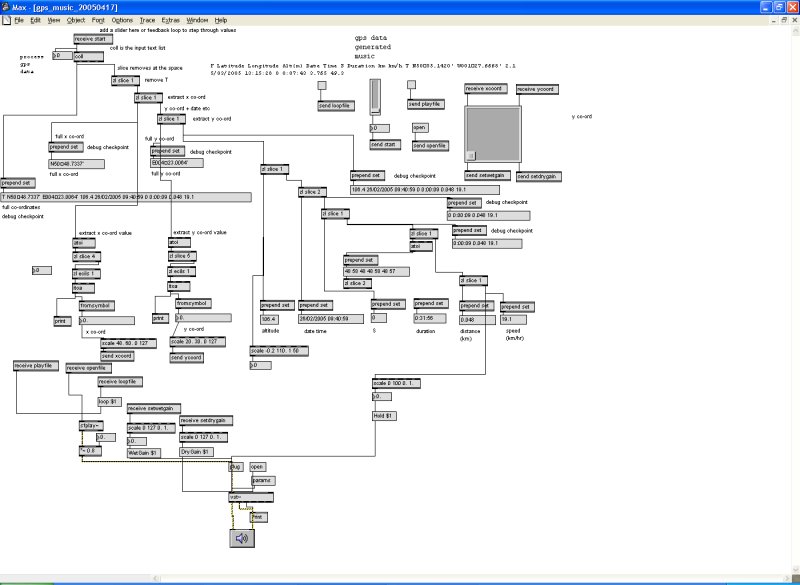
apart from the class notes I took we had to do a little project for the last day (4th day). I'd recently gone on the gps for artists workshop on Isle of Wight and bought myself a handheld gps device to record data on the driving trips I was doing. so, for my project, I made, with a lot of help from Sebastian! a patch which read gps data from a file, then parsed it into smaller sections to break it down into the different fields such as longitude & latitude, speed, direction, time, altitude etc. then I connected these values to the inputs of a vst filter/plugin called ambience, and played an audio recording and had the gps data adjust the filter parameters by stepping through the gps co-ordinates. also, the longitude & latitude are mapped to an x & y co-ordinate of a graph, so when the gps points are moved, you can see the x/y co-ords move too. for this version of the patch, I selected co-ords which would move around the screen according to the scale I chose. obviously if the area travelled is quite close, then the scale needs to be adjusted or you won't see much movement.
one day I'd like to expand the project so the gps data generates a music soundscape using samples I've recorded along the way. also it'll display geotagged photos taken on the journey as the gps points are processed.
attached is a screen shot of the patch and the actual patch, and some sample gps data. if you want to try it then you'd need your own audio file to open (any will do) and have the ambience vst plugin.
| Attachment | Size |
|---|---|
 gps_music_20050417.pat gps_music_20050417.pat | 8.84 KB |
| driving50-max-format.rtf | 4.93 KB |
::: location:
- kathy's blog
- Log in to post comments
- 10750 reads
Comments
rachelo3031
Sun, 11/01/2009 - 02:52
Permalink
coll
AliaK
Sun, 11/01/2009 - 12:47
Permalink
yes I added the 1-50 in the txt file